Marmite
A drum machine that composes itself
A generative drum machine that rolls the dice on every beat — eight voices holding together like a real kit, never locked to one fixed pattern.
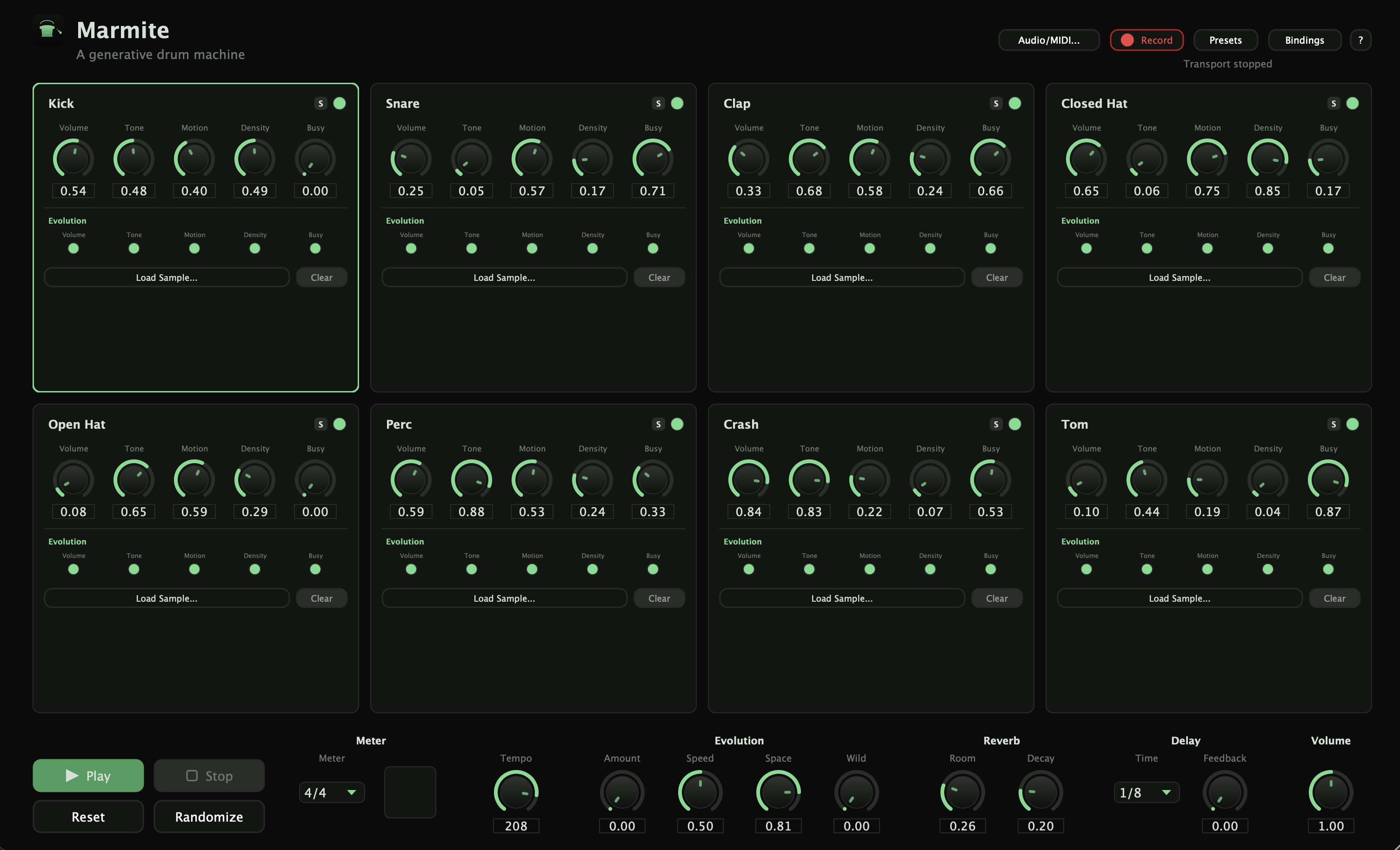
Most drum machines wait for you to program a pattern. Marmite doesn't wait — set the character of each voice, hit Play, and it starts generating on its own: 8 voices rolling the dice on every subdivision, each with its own sense of where it belongs in the bar, holding together like a real kit while never repeating exactly.
It's not a step sequencer and it's not a loop you're stuck with. Turn the Wild knob and the whole feel of the room shifts — from a locked-in basic beat, through breakbeat and Jungle syncopation, to full glitch chaos — while the kit keeps generating the whole time.
8 voices, fully synthesized
Kick, Snare, Clap, Closed Hat, Open Hat, Perc, Crash, and Tom, no sample library required — though every voice can load your own WAV/AIFF/FLAC/MP3/OGG instead.
Wild, Space, and Evolution
Three layers of autonomous drift: Wild reshapes the whole room's groove complexity, Space breathes the entire kit's density in and out, and Evolution keeps every individual knob wandering on its own over time.
Presets
A handful of factory presets to open and just play from, plus a full library for your own: save, recall, and build up your own starting points over time.
MIDI Out
Every generated hit mirrors out as a note on a standard drum channel, so Marmite can drive an external drum plugin or hardware module from the same pattern engine.
Full MIDI Learn, and Host Sync
Plays well with your existing setup, whether that's a hardware controller or a DAW session.
Free to download. If you find it worth supporting, a suggested donation of €15 is genuinely appreciated — but the full instrument is yours either way, no feature gate, no pressure.
Before you install
- This isn't code-signed yet, so your OS will warn you on first launch — that's expected, not a sign anything's wrong.
- Windows: click "More info" → "Run anyway."
- Mac: System Settings → Privacy & Security → "Open Anyway."
- To install the VST3/AU, copy the file into your system's plugin folder — C:\Program Files\Common Files\VST3\ on Windows, or ~/Library/Audio/Plug-Ins/VST3/ / /Library/Audio/Plug-Ins/Components/ on Mac — then rescan plugins in your DAW.
- In Ableton specifically, don't use "Install Packs" — that's for Ableton's own Pack format, not third-party plugins, and will fail with a misleading "corrupt" error.